Azure Virtual Network Explained Simply
Published on September 24, 2026
Azure Virtual Network Explained Simply
When discovering Microsoft Azure, one of the first services you should understand is Azure Virtual Network (VNet). Although the concept may sound technical at first, it can be compared to a traditional corporate network found in an on-premises datacenter.
In simple terms, Azure Virtual Network is your private network in the cloud.
What Is Azure Virtual Network?
An Azure Virtual Network (VNet) allows Azure resources to communicate securely within a private networking environment.
Virtual machines, databases, applications, and many other Azure services can be deployed inside a VNet to exchange traffic securely and efficiently.
Think of a VNet as the cloud equivalent of a company's local area network (LAN).
Why Do You Need a VNet?
Without a network, resources would not be able to communicate with each other.
A VNet enables organizations to:
- Connect multiple virtual machines.
- Control network traffic.
- Segment environments.
- Restrict unauthorized access.
- Connect Azure resources to on-premises networks.
As a result, VNets form the foundation of many Azure architectures.
Understanding Subnets
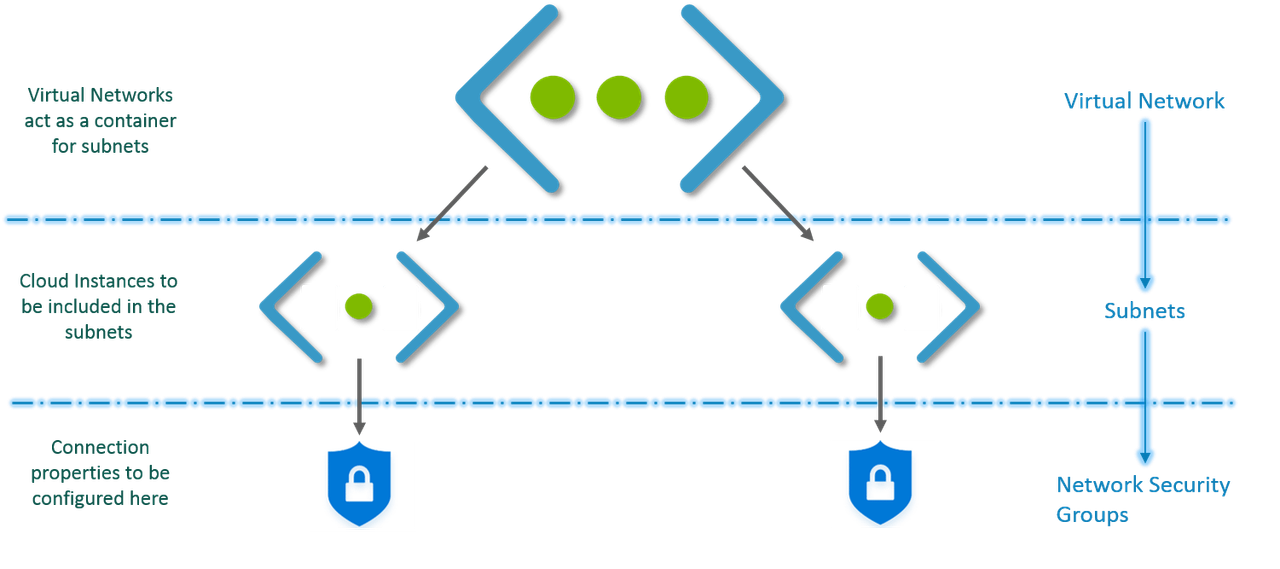
Inside a VNet, you can create multiple subnets.
This concept is similar to dividing a corporate network into separate sections for security and organizational purposes.
Example
A VNet could be divided into:
- Frontend Subnet for web servers.
- Backend Subnet for application servers.
- Database Subnet for database systems.
This separation improves security and traffic management.
Network Security Groups (NSGs)
Network Security Groups (NSGs) are used to filter network traffic.
They act like firewall rules that determine:
- Who can communicate.
- With which destination.
- Through which port.
- In which direction (inbound or outbound).
For example, you might allow users to reach a web server over HTTPS while blocking unnecessary traffic.
Communicating with the Internet
Some Azure resources can communicate with the Internet by default.
However, administrators can precisely control connectivity using:
- Public IP addresses.
- Network Security Groups.
- Azure Firewall.
- Route tables.
This flexibility allows organizations to maintain an appropriate security posture.
Connecting Azure to Your Organization
One of the strengths of Azure Virtual Network is its ability to connect with on-premises infrastructure.
Two common options exist:
VPN Gateway
Traffic travels through the public Internet using an encrypted tunnel.
This option is cost-effective and relatively easy to deploy.
ExpressRoute
ExpressRoute provides a dedicated private connection between an organization and Microsoft Azure.
It typically offers higher performance, lower latency, and improved reliability.
Communication Between VNets
Large organizations often deploy multiple VNets.
Using VNet Peering, these networks can communicate directly without traversing the public Internet.
This capability is especially useful for:
- Production environments.
- Test environments.
- Multi-region deployments.
- Large enterprises with multiple teams.
A Practical Example
Imagine a company hosting a web application in Azure.
Its architecture could include:
- One primary VNet.
- A subnet for web servers.
- A subnet for application servers.
- A subnet for databases.
- NSG rules controlling traffic.
- A VPN connection to headquarters.
This approach provides both segmentation and security.
Key Takeaways
Azure Virtual Network is the networking foundation of most Azure deployments.
Remember these key points:
- A VNet is a private network in Azure.
- Subnets are used to segment the network.
- NSGs control network traffic.
- VPNs and ExpressRoute connect Azure to on-premises environments.
- VNet Peering enables communication between Azure networks.
Conclusion
Azure Virtual Network is one of the first Azure services every cloud professional should understand. Despite its technical name, the concept is straightforward: it provides a secure, flexible, and private network for hosting cloud resources.
Understanding VNets, Subnets, NSGs, and VNet Peering is a key step toward designing secure Azure architectures and succeeding in Microsoft certification exams.
Studying for an Azure certification? Azure Virtual Network is a fundamental topic covered in the AZ-900 exam. To strengthen your understanding of Azure core services and cloud networking concepts, explore our AZ-900 certification preparation program.